
ERP & MRP for small manufacturers
The all-in-one system for small manufacturers and makers.
GodKey MFG puts inventory, recipes and cost per unit, production batches, purchasing and supplier bills, invoicing, accounting, HR and payroll prep in one connected suite — built for shops of about 1–20 people who make products from recipes in batches. Here is everything it does, and how it fits together.
What all-in-one means
One record of your business — not five apps and a spreadsheet.
Most small manufacturers run on a patchwork: a spreadsheet for recipes and costs, an inventory app, accounting software, a payroll service, and a lot of typing between them. Every hand-off is a chance for a number to go stale — and the cost per unit is usually the first casualty.
In GodKey MFG, there’s one record. A delivery is entered once, and that single entry updates the purchase order, the stock on the shelf, each material’s cost, every recipe that uses it, and your books. When you complete a batch or make a sale, the same thing happens. Enter it once, use it everywhere.
And nothing posts behind your back: supplier bills, bank statement lines and imported sales wait for your review. Mistakes are reversed, never erased, so the history of what happened is always there.
Guided setup
Seven short steps, in plain words.
A new company is walked through setup: your company, what you make, who you are, what’s already on your shelf, what was in the bank, how you number things and what you connect. These are real screens from the app.
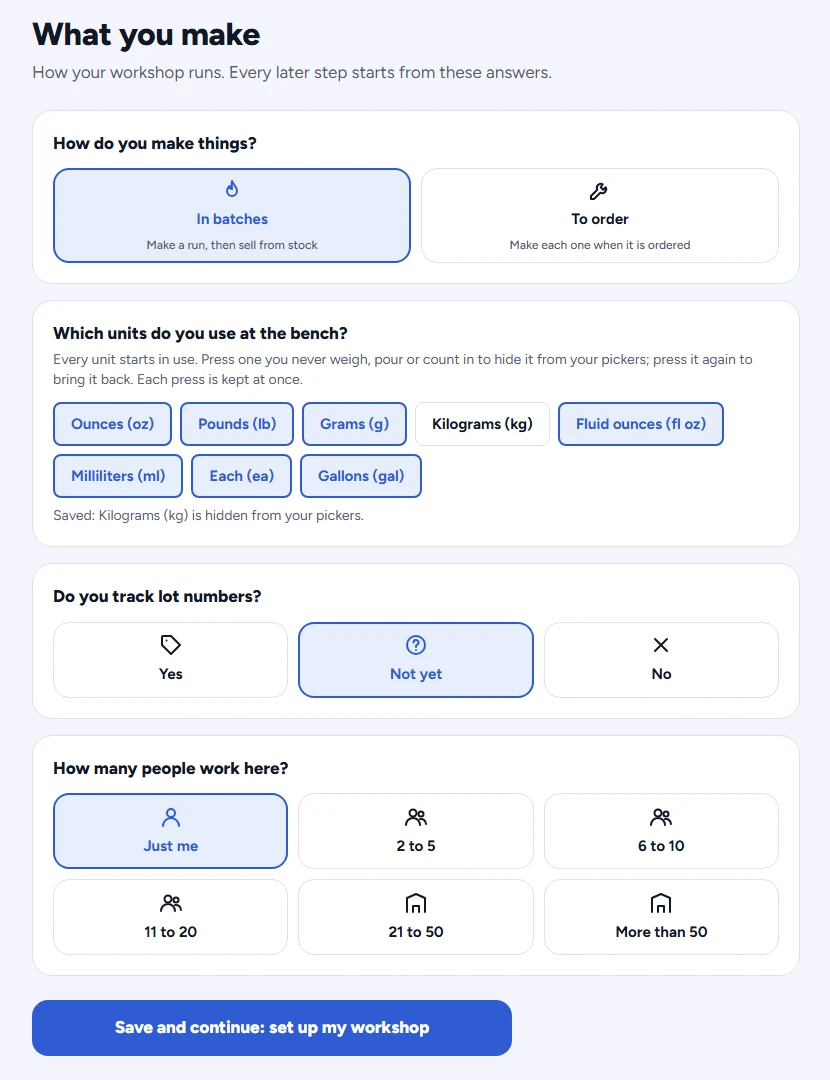
Step 2 — what you make, in batches or to order, and the units you use at the bench.
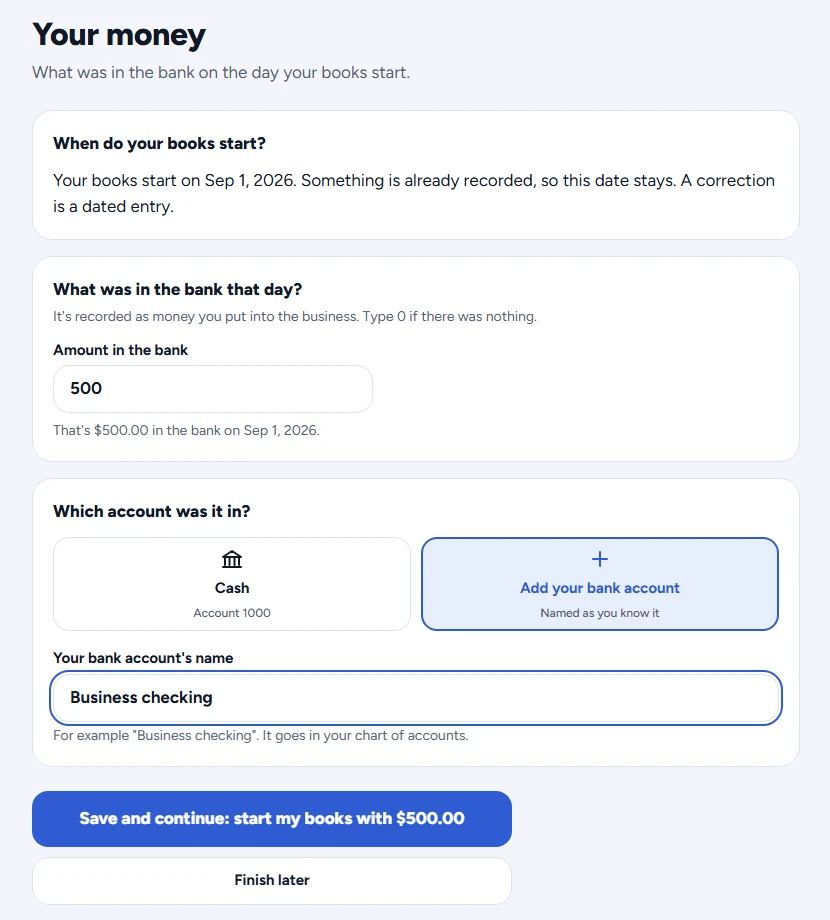
Step 5 — what was in the bank the day your books start, so your reports begin from real figures.
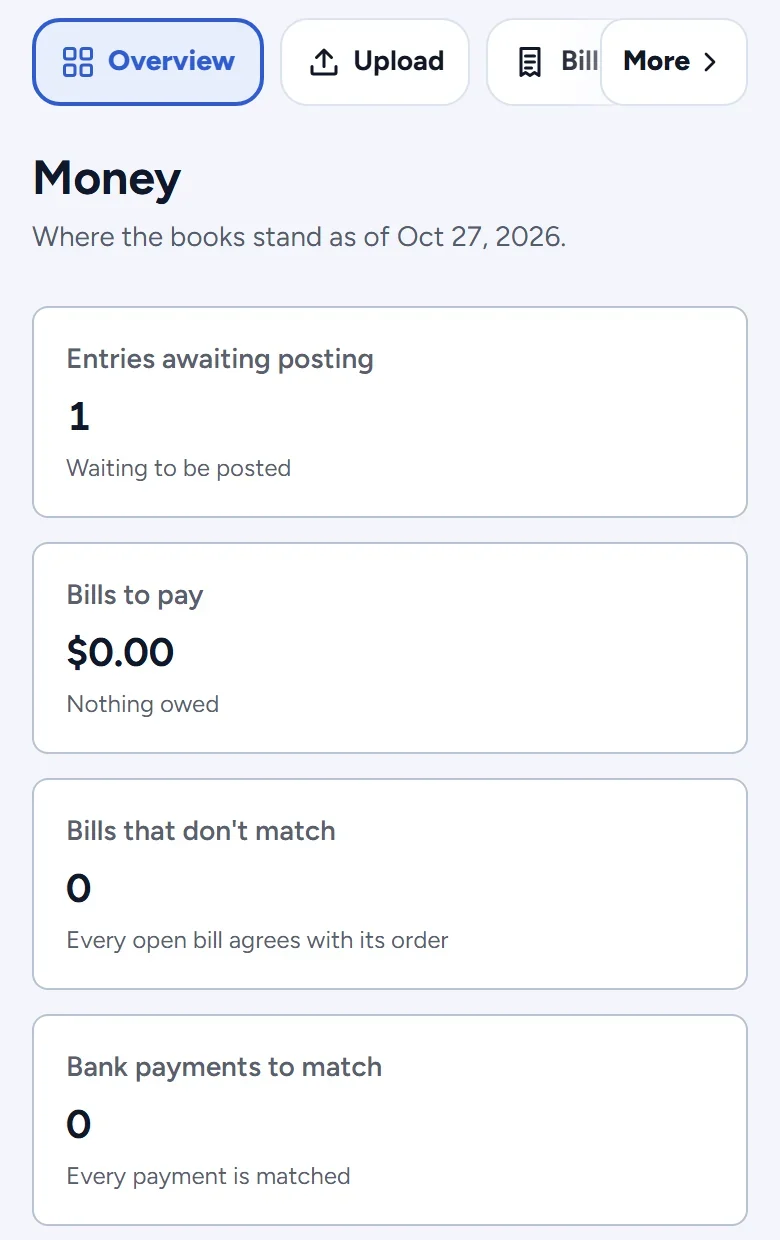
Your books, on your phone
The Money page shows where the books stand today: entries waiting for you to post, bills to pay, bills that don’t agree with their order, and bank payments still to match. Nothing posts until you say so.
The suite
Six connected parts.
Each one is useful on its own. Together, they replace the patchwork.
Inventory & Materials
Know what you have, what it cost and where it went. Every pound of wax, ounce of fragrance and finished bar is tracked in its own unit, and stock only changes through a recorded movement — so the number on screen is the number on the shelf.
- Raw materials and finished goods, each in its own units of measure
- Stock changes only through a recorded movement: receipt, batch, sale, count or adjustment
- Stock can’t go below zero — a short batch is caught before it happens
- Full movement history: what changed, when and who did it
- Phone camera scanning to look up an item by its printed code
- Weighted average cost that updates as materials arrive, freight included
Connects: Fed by receipts and batches; feeds costing, production and cost of goods sold.
Inventory & Materials in detailRecipes & Product Costing
Most makers underprice because their cost per unit leaves things out. GodKey builds it from what you actually paid — including freight — and spreads the cost of rejected units over the good ones, so the number is honest.
- Recipes (bills of materials) with ingredients, yield and versions
- Standard cost (what it should cost) and actual cost (what it did cost)
- Freight, duty and handling on a receipt spread into the materials’ cost
- Labor from dated labor rates
- Rejected units absorbed by the good units — divided by what you can sell
- Says “incomplete” and names the missing ingredient cost, instead of showing a number that’s too low
Connects: Uses what you actually paid for materials; sets the cost every batch and sale posts at.
Recipes & Product Costing in detailProduction Batches
Plan a batch from a recipe, see whether you have enough of everything, and complete it with your started, good and rejected counts. One step uses up the ingredients, adds the finished goods and posts the cost.
- Plan a batch from any recipe and check stock first
- Complete with started, good and rejected counts
- Ingredients used and finished goods added in one step
- Batch cost posts to your books automatically
- A completed batch can be reversed — history is never edited
- A simple “Make” screen built for the shop floor and your phone
Connects: Uses up materials, adds finished goods and posts the batch cost — all in one step.
Production Batches in detailPurchasing & Supplier Bills
Order it, receive it, pay for it — one connected record. Upload a supplier invoice and GodKey reads it for you, matches it to the purchase order and what you actually received, and flags anything that doesn’t line up. Nothing posts until you’ve reviewed it.
- Suppliers and purchase orders for materials or goods for resale
- Approve, send, cancel, and receive in part or in full
- Freight and handling on a receipt spread into the materials’ cost
- Upload a bill: an AI reader pulls out the details for you to review
- Three-way match: bill vs. purchase order vs. what you received
- Mismatches flagged in plain words; nothing posts without your review
Connects: Receipts update stock and cost; bills are matched to orders and receipts before they post.
Purchasing & Supplier Bills in detailAccounting & Invoicing
Every receipt, batch and sale already knows its cost — so your books do too. Invoice customers, record payments and refunds, and read a profit and loss that includes the real cost of what you sold.
- Invoices with a review step before they go out; print or download a PDF
- Payments, partial payments, refunds and voids
- Sales tax, shipping and cost of goods sold posted automatically
- Chart of accounts and journal entries (created, then posted)
- Profit & loss, balance sheet, cash flow and trial balance
- Bank statement upload (CSV, Excel or PDF), with duplicates skipped
- Owner tools: business mileage at the IRS rate, money you put in and take out, and a sales tracker
Connects: Every receipt, batch, bill and sale lands here. No re-typing.
Accounting & Invoicing in detailTeam, HR & Payroll Prep
As your shop grows past one person, GodKey keeps people organized: employee records, timesheets, payroll preparation, expense claims, contractors and 1099s — with roles and approvals so no one approves their own work.
- Employee records, compliance documents with expiry warnings, performance reviews
- Timesheets with approval, and dated labor rates
- Payroll preparation: gross pay, FICA and deductions, posted after approval
- Contractors with encrypted tax IDs, and 1099-NEC forms
- Expense claims with receipts and approval
- Six roles and separation-of-duties approvals you configure
Connects: Labor rates feed product cost; approved payroll posts to the books.
Team, HR & Payroll Prep in detailOne batch, start to finish
Watch a single candle batch move through the whole business.
- 1
Order
Raise a purchase order for 20 lb of soy wax, 100 jars and fragrance.
- 2
Receive
The delivery comes in. Record it against the order — the $22 freight is spread into the wax and jar costs.
- 3
Bill
Upload the supplier’s invoice. GodKey reads it and checks it against what you ordered and received. You approve.
- 4
Make
Plan a batch from the candle recipe, check stock, pour. Complete it: 100 started, 92 good, 8 rejected.
- 5
Cost
Cost per good candle is worked out from what you actually paid — rejects spread over the 92.
- 6
Sell
Invoice a shop, or import your Square sales for review. Stock goes down; cost of goods sold goes up at the real cost.
- 7
Know
Your profit and loss, balance sheet and inventory value are already up to date. Nothing was typed twice.
How it compares
Where GodKey fits.
A general comparison of approaches — every product is different, so check the specific tools you’re considering.
| What you need | Spreadsheets | Accounting app + inventory app | Enterprise ERP | GodKey MFG |
|---|---|---|---|---|
| Cost per unit includes freight-in and rejects | ||||
| Inventory, production and books in one system | ||||
| Supplier bills read and matched for you | ||||
| Built for shops of 1–20 people | ||||
| Works on a phone on the shop floor | ||||
| Set up without a consultant |
Comparing named products? See Craftybase / Stocksmith, Katana, QuickBooks, inFlow and Odoo side by side.
✓ yes · – partly or with add-ons · ✕ no. General design of each approach as of October 2026.
ERP, MRP, inventory app — what’s the difference?
Inventory software tracks what’s on the shelf. MRP (material requirements planning) adds recipes and production: what materials you need to make what you plan to sell. ERP (enterprise resource planning) connects all of that to purchasing, sales, accounting and people.
For a small batch maker, the line between them matters less than whether your numbers connect. GodKey MFG covers the MRP side — recipes, materials, production, purchasing — and the ERP side — invoicing, double-entry books, HR and payroll prep — in one system, sized and priced for a small shop.
Is GodKey MFG right for you?
A great fit if you make products from recipes in batches, have about 1–20 people, and are tired of rebuilding costs in a spreadsheet.
Not a fit yet if you need lot tracking, job-shop routing, multi-step assembly, or Shopify sync today. We’ll say so plainly — those are on the list, not in the box.
Free until March 29, 2027
Then Starter $39 · Growth $79 · Pro $149 a month. Every feature in every plan.
Questions
ERP for small manufacturers, answered.
What is an ERP for small manufacturers?
ERP (enterprise resource planning) software connects the parts of a business — inventory, purchasing, production, sales and accounting — in one system with one set of data. An ERP for small manufacturers does that without the cost, setup time or complexity of software built for large companies.
What is the difference between ERP and MRP?
MRP (material requirements planning) focuses on materials and production: what you need, when, to make what you plan to sell. ERP covers that plus purchasing, sales, accounting and people. GodKey MFG covers recipes, materials, production and purchasing like an MRP, and adds invoicing, accounting, HR and payroll preparation.
Is QuickBooks enough for a small manufacturing business?
Accounting software is built around the ledger, so it handles bills, invoices and reports well. What small manufacturers usually add is the product side — recipes, batches, yield and cost per unit — which is where GodKey MFG starts, with full double-entry books underneath. Talk to your accountant about whether to switch or run both during the beta.
How long does it take to set up?
GodKey MFG walks a new company through seven short setup steps: your company, what you make, who you are, what’s already on your shelf, what was in the bank on the day your books start, how you number things and what you connect. If you sell on Square, GodKey can create your products from your Square catalog and ask how many of each you have on hand.
What does it cost?
It’s free during the beta, until March 29, 2027, with no card needed. After that, plans are $39, $79 or $149 a month (or two months free yearly).
What isn’t built yet?
Overhead allocation in product cost; Lot tracking; Several products from one batch (like boards, slabs and sawdust from one log), grades and sizes as variants, and drying or curing stages; Job-shop routing and multi-step assembly; Automatic bank matching (linking is by hand, with suggestions); Shopify sync and live bank feeds; Payroll tax filing and income-tax withholding calculations; Emailing invoices from GodKey. Beta feedback decides what comes next.
Stop rebuilding your costs in a spreadsheet.
The wait is over — the beta is live. Free until March 29, 2027 — no card needed. Seats are limited.