
What you can do
- Suppliers and purchase orders for materials or goods for resale
- Approve, send, cancel, and receive in part or in full
- Freight and handling on a receipt spread into the materials’ cost
- Upload a bill: an AI reader pulls out the details for you to review
- Three-way match: bill vs. purchase order vs. what you received
- Mismatches flagged in plain words; nothing posts without your review
See it in the app
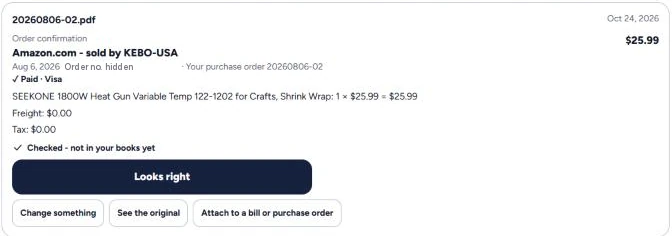
Upload a supplier’s invoice or order — GodKey reads it, and you check it before anything reaches your books.
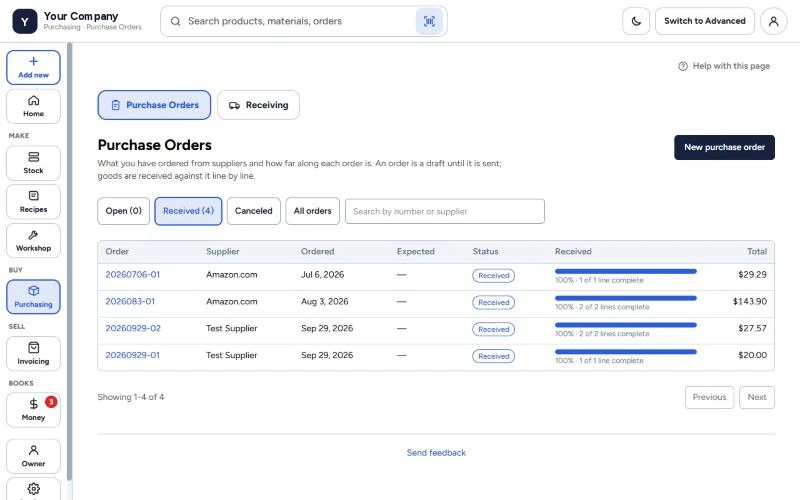
Purchasing — every order, and how much of it has arrived.
Upload the bill. Review. Approve.
That’s the whole idea behind GodKey: you upload supplier invoices and bills, GodKey reads and matches them, and you approve a short list. A bill that charges for 50 lb when you received 40 is flagged before you pay it.
Questions
Can GodKey MFG read supplier invoices automatically?
Yes. Upload the invoice and an AI reader pulls out the supplier, lines and amounts. You review what it found before a bill or order is recorded — nothing posts on its own.
What is a three-way match?
Checking a supplier’s bill against the purchase order and what you actually received. If the quantities or prices don’t line up, GodKey flags it before you pay.